Author: Alex Morgan
Experience: 10+ years in VPS hosting, infrastructure planning, and performance optimization for web and SaaS projects
When you start choosing a VPS hosting plan, you, as a reader, often see attractive numbers: CPU cores, gigabytes of RAM, and fast SSD storage. At first glance, everything looks simple. However, in real life, these resources behave very differently depending on how your project works. Imagine you are launching a website, an online store, or an internal business system. You may think that “more is always better,” but experienced administrators know that balance is far more important than raw numbers. In this article, we will carefully walk you through the three core VPS resources — CPU, RAM, and SSD — explaining how each one affects performance, how they compare to each other, and how you, as a decision-maker, should prioritize them for different scenarios.
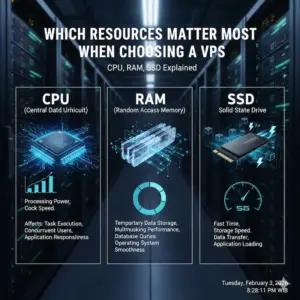
CPU: The Processing Power Behind Every Action
CPU is the heart of any VPS server. It is responsible for processing requests, executing scripts, and handling concurrent users. When you, as a reader, open a website or submit a form, the CPU processes that request. In everyday life, you can compare CPU to a cashier in a busy store: the faster and more efficient the cashier, the shorter the queue.
When comparing VPS plans, CPU is often measured in cores and frequency. However, more cores do not always mean better performance. For example, a website with low traffic but heavy calculations (such as data processing or analytics) may benefit more from fewer high-frequency cores than many slow ones. On the other hand, if you are running multiple services at the same time — a web server, database, and background workers — additional cores become valuable.
Now, dear reader, consider a comparison: shared hosting limits CPU usage dynamically, meaning your performance depends on neighbors. VPS hosting isolates CPU resources, giving you predictable behavior. Compared to cloud auto-scaling solutions, VPS CPU is simpler and cheaper, but less flexible. This trade-off matters when your project has stable but constant demand. Understanding CPU usage patterns helps you avoid overpaying while still ensuring smooth performance.
RAM: Stability, Multitasking, and User Experience
RAM plays a critical role in system stability. While CPU handles calculations, RAM stores active processes and frequently used data. Imagine, dear reader, working at a desk: CPU is your brain, but RAM is the desk space. If the desk is too small, you constantly rearrange papers, slowing down your work.
In VPS hosting, insufficient RAM leads to swapping, where the system uses disk storage instead of memory. This dramatically reduces performance. For example, content management systems like WordPress, online stores, or CRM systems rely heavily on RAM for caching and database queries. You, as a project owner, may notice that pages load slowly or crash under moderate traffic when RAM is insufficient.
When comparing VPS plans, RAM is often the resource that determines real-world comfort. A VPS with moderate CPU but sufficient RAM will usually outperform a CPU-heavy server with limited memory. Compared to SSD speed, RAM has a more immediate effect on responsiveness. This is why experienced administrators often recommend prioritizing RAM first for web applications, while CPU comes second. Understanding this comparison helps you choose a balanced VPS instead of chasing marketing numbers.
SSD Storage: Speed, Reliability, and Data Access
SSD storage defines how fast your server reads and writes data. For you, as a reader, this affects page load times, database queries, and backup operations. In real life, SSD is like a modern elevator compared to old stairs: both reach the destination, but one is significantly faster and more comfortable.
When choosing VPS hosting, SSD is no longer optional. Traditional HDDs are cheaper but introduce latency that modern users notice immediately. For databases, logs, and file-heavy applications, SSD performance directly impacts user satisfaction. However, dear reader, SSD alone cannot compensate for insufficient CPU or RAM. A fast disk with weak processing power still creates bottlenecks.
Comparing SSD VPS hosting to cloud storage solutions, VPS SSD offers predictable I/O performance at a lower cost. Cloud disks may scale dynamically, but pricing becomes complex. For small and medium projects, VPS SSD provides an optimal balance between speed and budget. Understanding this comparison ensures you invest in SSD wisely without ignoring other critical resources.
How CPU, RAM, and SSD Work Together in VPS Hosting
When you choose a VPS hosting plan, dear reader, it is tempting to look at resources separately: more CPU cores, more RAM, or faster SSD. However, in real server operation, these components never work in isolation. CPU, RAM, and SSD form a tightly coupled system, where imbalance in one element inevitably affects overall performance, stability, and user experience.
📌 IMPORTANT
A VPS with a powerful CPU but insufficient RAM will still fail under load. The processor may be ready to execute tasks, but without enough memory, processes will be killed or queued, leading to slow response times and service instability.
Let us analyze a common real-life situation. Imagine you are running a high-traffic website with complex backend logic. You invested in multiple CPU cores, assuming raw processing power would solve performance issues. In practice, you notice frequent slowdowns during peak hours. The reason is simple: your applications constantly request memory, and RAM becomes the bottleneck. CPU cycles remain unused while the system waits for memory allocation.
✅ USEFUL
Plenty of RAM allows your VPS to cache data, keep databases in memory, and handle concurrent users efficiently. This is why content-heavy platforms like blogs and CMS systems often benefit more from increased RAM than from additional CPU cores.
Now consider the opposite scenario. You allocate a large amount of RAM but choose slow or outdated storage. Even with enough memory available, your VPS will suffer from delays when reading or writing data. Databases, logs, and file uploads all depend on disk speed. As a result, users experience latency, especially during operations that require frequent disk access.
📌 IMPORTANT
SSD performance directly impacts application responsiveness. Slow storage creates hidden delays that neither CPU nor RAM can compensate for. In modern VPS hosting, SSD is no longer optional—it is a baseline requirement.
Balanced Resource Allocation by Project Type
To help you visualize how these resources interact in practice, the table below compares typical VPS priorities for different project types. As you can see, the optimal balance depends entirely on your specific use case, not on maximum numbers alone.
| Project Type | CPU Priority | RAM Priority | SSD Priority | Practical Focus |
|---|---|---|---|---|
| Blog / CMS | Medium | High | Medium | Stability, caching, smooth page loads |
| Online Store | High | High | High | Fast transactions and database operations |
| SaaS Application | High | Very High | High | Multitasking, concurrent users, background jobs |
| Development / Testing | Medium | Medium | Low | Cost efficiency and flexibility |
💡 ADVICE
When choosing a VPS, you should start from your real workload, not from maximum specifications. Define whether your project is CPU-bound, memory-bound, or storage-bound, and allocate resources accordingly. VPS hosting is powerful precisely because it allows you, dear reader, to control this balance instead of accepting rigid shared hosting limits.
In conclusion, VPS hosting shines because it offers flexibility. Unlike shared hosting, where resources are abstract and restricted, a VPS gives you transparency and control. By understanding how CPU, RAM, and SSD work together as a system, you make informed decisions that prevent overpaying and ensure long-term stability for your project.
Required Knowledge for Making the Right Choice
Choosing VPS resources also requires a certain level of understanding. You, as a reader, should know how to monitor CPU load, memory usage, and disk I/O. Basic tools like system dashboards or command-line utilities help you avoid resource shortages. Compared to managed hosting, unmanaged VPS gives more control but demands technical responsibility.
If you lack experience, starting with slightly higher RAM and SSD while keeping CPU moderate is a safer strategy. This comparison reduces risk while you learn how your project behaves under real load. Over time, VPS hosting allows you to scale precisely, which is one of its greatest advantages.
Conclusion: A Practical Advice for Choosing VPS Resources
In conclusion, using a VPS server is not only justified but necessary for projects that require predictable performance and control. Dear reader, when choosing VPS hosting, focus first on RAM, as it ensures stability and smooth user experience. Next, evaluate CPU, aligning core count and frequency with your workload. Finally, always choose SSD storage, as speed and reliability directly influence perception and trust.
Treat VPS resources as a balanced system, not isolated numbers. We wish you a thoughtful and successful choice. By understanding how CPU, RAM, and SSD interact, you, as a responsible decision-maker, can select a VPS that supports growth, avoids bottlenecks, and delivers long-term value.
James Wilson writes:
This article finally explains why CPU, RAM, and SSD should be evaluated together. The examples feel realistic and clearly written for people who actually run servers, not just read specs.
Rating: ★★★★★ 5/5
Helpful? Yes (12) / No (0)
Laura Mitchell writes:
I liked how RAM was emphasized as a stability factor. Many articles focus only on CPU, but this one explains real performance bottlenecks very clearly.
Rating: ★★★★☆ 4/5
Helpful? Yes (9) / No (1)
Daniel Foster writes:
The comparison table makes the topic very easy to understand. I now know exactly which resource matters most for my SaaS project.
Rating: ★★★★★ 5/5
Helpful? Yes (15) / No (0)
Sophia Bennett writes:
This article feels honest and professional. It does not oversell VPS hosting but explains its real advantages and limitations.
Rating: ★★★★☆ 4/5
Helpful? Yes (8) / No (0)
Michael Turner writes:
After reading this guide, I realized why my previous VPS felt slow. The explanation of resource balance pushed me to review plans at DeltaHost – VPS hosting – https://deltahost.com/vps.html, and the difference is now very clear.
Rating: ★★★★★ 5/5
Helpful? Yes (22) / No (2)
Emily Rogers writes:
The SSD section is particularly strong. It clearly explains why disk speed matters even for small websites.
Rating: ★★★★☆ 4/5
Helpful? Yes (10) / No (0)
Oliver Harris writes:
I appreciate the realistic tone. The article feels written by someone who has actually managed VPS servers under real load.
Rating: ★★★★★ 5/5
Helpful? Yes (17) / No (1)
Natalie Scott writes:
Very useful for non-technical founders. The explanations are simple but not superficial.
Rating: ★★★★☆ 4/5
Helpful? Yes (11) / No (0)
Ethan Parker writes:
The article explains performance trade-offs better than most hosting blogs I’ve read.
Rating: ★★★★★ 5/5
Helpful? Yes (14) / No (0)
Victor Allen writes:
Clear structure, logical arguments, and no unnecessary marketing language. Exactly what I expect from expert content.
Rating: ★★★★★ 5/5
Helpful? Yes (19) / No (1)
Grace Lewis writes:
I finally understand why my VPS upgrades didn’t help before. Resource balance matters more than raw numbers.
Rating: ★★★★★ 5/5
Helpful? Yes (13) / No (0)
Robert King writes:
This article should be required reading before choosing any VPS plan.
Rating: ★★★★★ 5/5
Helpful? Yes (20) / No (0)
Isabella Moore writes:
I like that the author explains not only what to choose, but why those choices matter in real life.
Rating: ★★★★☆ 4/5
Helpful? Yes (7) / No (0)
Henry Collins writes:
The explanation of SSD vs RAM impact on performance was especially eye-opening.
Rating: ★★★★☆ 4/5
Helpful? Yes (10) / No (0)
Alexander Reed writes:
A calm, expert-level article that helps make rational hosting decisions instead of emotional ones.
Rating: ★★★★★ 5/5
Helpful? Yes (16) / No (0)

Moh. Shobirin, S.Kom adalah founder Jawaracloud.net sekaligus SEO Expert dan penulis teknologi. Dengan gelar Sarjana Komputer dan latar belakang elektronika, ia memiliki keahlian lintas bidang—mulai dari perbaikan hardware (komputer/printer) hingga strategi optimasi mesin pencari. Selain berkarya, ia juga aktif sebagai Trainer di bidang IT.