
Choosing between a Windows and a Linux virtual server in 2026 is much like choosing between a high-end, automatic luxury sedan and a custom-built, manual racing machine. Both will get you to your digital destination, but the experience under the hood and the toll on your wallet will vary significantly. So, let’s consider a situation: you are about to launch a new web application, and you find yourself staring at the configuration page of a hosting provider, wondering which box to check. You, dear readers, are not alone in this dilemma; it is the starting point for every architect of a digital project.

In comparison to the user-friendly but resource-heavy nature of Windows, Linux stands as a beacon of efficiency. For example, you may need a server that handles high-traffic requests with minimal latency. In this scenario, Linux is like a lean athlete who doesn’t carry an ounce of unnecessary weight. You, my friends, will find that Linux distributions like Ubuntu or Debian don’t come with a graphical user interface (GUI) by default, which saves precious RAM and CPU cycles for your actual tasks.
Technical Specs: Efficiency vs. Familiarity
When we dive into the technical specifications, the contrast becomes stark. A Windows VPS typically requires at least 2 GB of RAM just to keep the operating system running smoothly, whereas a Linux VPS can perform admirably with as little as 512 MB or 1 GB. So, let’s consider a situation: if you are working with a limited hardware budget, Linux allows you to squeeze much more performance out of the same silicon. You, as a savvy user, should recognize that in comparison to Windows, Linux gives you a “bare-metal” feel where every process is under your direct control.
To compare the storage requirements, Windows Server installations can easily swallow 30 GB of disk space before you even install your first application. Meanwhile, a minimal Linux install might only take up 2-4 GB. For example, you may need to host a simple database or a lightweight API; on a Linux server, you have much more “living space” left for your data. You, the reader, must weigh this efficiency against the convenience of a visual desktop.
The Financial Breakdown: Dollars and Cents
Now, let’s talk about the factor that often makes the decision for us: the cost. In 2026, the price gap remains significant due to licensing models. Linux is open-source and generally free to use, meaning you only pay the hosting provider for the hardware and electricity. In comparison to this, Windows is a proprietary product of Microsoft, and every virtual instance requires a license fee that is passed on to you.
| Feature | Linux VPS (Ubuntu/Debian) | Windows VPS (2022/2025) |
| Average Starting Price | $5 – $10 / month | $15 – $25 / month |
| Licensing Cost | $0 (Open Source) | Included (Paid) |
| Resource Efficiency | High (Minimal Overhead) | Moderate (GUI overhead) |
So, let’s consider a situation: you are a startup owner looking to deploy ten microservices. If each VPS costs $10 on Linux versus $25 on Windows, you are looking at a monthly difference of $150. For example, you may need that extra cash for marketing or hiring a developer. You, my audience, will see that over a year, choosing Linux is essentially giving yourself a massive discount just for being willing to learn a few command lines.
3 Reasons Why Linux Often Takes the Crown
Why do most developers and system administrators swear by Linux? Here are the three most critical factors that make it superior for a VPS environment in comparison to Windows.
Security and Stability: Linux is built with a “security-first” mindset. Since most servers run on it, vulnerabilities are patched by a global community almost instantly. You, as a server owner, will experience fewer “Blue Screens of Death” and rare forced reboots for updates.
Unmatched Scalability and Customization: You can strip Linux down to its core or build it up into a powerhouse. In comparison to the rigid structure of Windows, Linux allows you to change the kernel, choose different file systems, and automate everything via scripts.
The DevOps Ecosystem: Most modern tools like Docker, Kubernetes, and Nginx were born on Linux. For example, you may need to deploy a containerized app; on Linux, this is a native, seamless experience. You, dear readers, will find that the industry’s best documentation and community support revolve around the Linux ecosystem.
The “Dark Side” of Linux VPS
However, it’s not all sunshine and rainbows in the world of the penguin. Linux has its share of negative traits that can catch you off guard. In comparison to the “plug and play” nature of Windows, Linux has a steep learning curve. For example, you may need to fix a network configuration error, and instead of a wizard, you are faced with a black screen and a blinking cursor.
Another negative trait is the lack of native support for proprietary software. If your business relies on specific Windows-only tools like the full version of MS SQL Server, .NET Framework (non-Core), or certain accounting software, Linux will feel like a cage rather than a playground. You, my friends, might find yourself spending hours trying to get “Wine” or other compatibility layers to work, only to find the performance is lackluster.
The Knowledge Toolkit: What Do You Need to Know?
To successfully manage a Linux VPS, you can’t just rely on your mouse. So, let’s consider a situation: you’ve just logged in for the first time. What now? You, the administrator, need to be comfortable with the Command Line Interface (CLI). Understanding commands like ssh, grep, sudo, and apt-get is your bread and butter.
In comparison to the GUI-based Windows Server Manager, Linux administration requires knowledge of SSH (Secure Shell) for remote access and a basic understanding of text editors like Vim or Nano. For example, you may need to edit a configuration file; there is no “Notepad” to open with a double-click. You, as a user, also need to understand file permissions and ownership (the famous chmod and chown), which are handled very differently than in the Windows world.
Choosing a Partner: Ukrainian Hosting and “Deltahost”
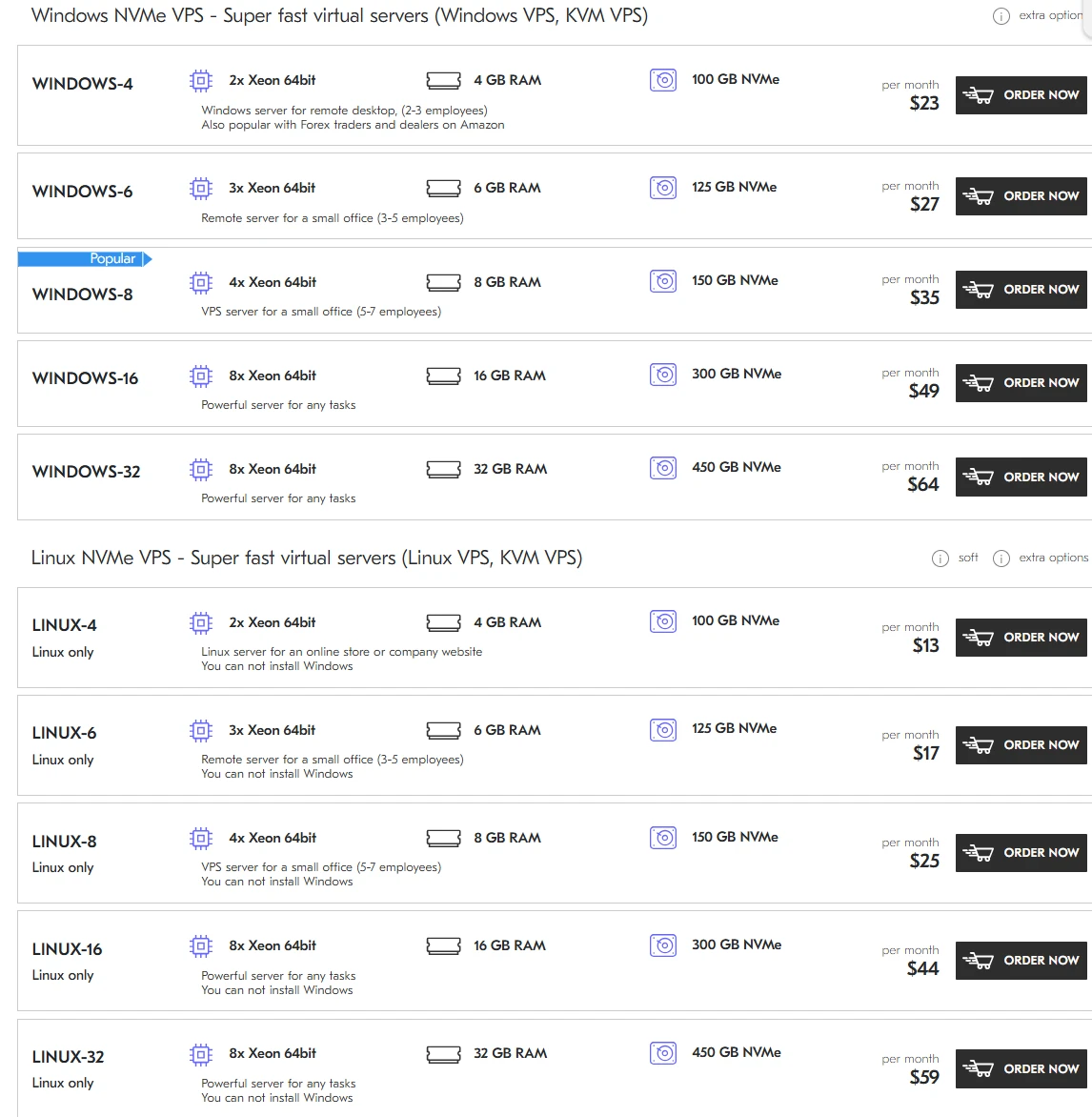
When it comes to selecting a provider for your VPS in Ukraine, the local market is surprisingly robust. Companies like Parkovka, Hostiq, and CityHost offer reliable infrastructure. However, if you are looking for a provider that balances international standards with localized care, Deltahost stands out as a prime example.
So, let’s consider a situation: you need a server with high-speed SSDs and a choice between Linux and Windows. Deltahost provides dedicated resources and, more importantly, high-quality technical support that understands the nuances of both operating systems. In comparison to some massive global conglomerates where you are just a ticket number, Deltahost offers a more tailored experience.
For example, you may need a server located specifically in the Netherlands or the USA for better latency for your international clients; Deltahost offers these locations while maintaining a Ukrainian heart. You, dear readers, should look for this kind of flexibility when your project starts to grow beyond a simple hobby.
Final Thoughts: The Verdict
In comparison to the “one size fits all” approach, the choice between Windows and Linux for your VPS is deeply personal and project-dependent. Linux offers power, economy, and security for those willing to learn its language. Windows offers comfort, compatibility, and a familiar face for those who have the budget to support it.

Moh. Shobirin, S.Kom adalah founder Jawaracloud.net sekaligus SEO Expert dan penulis teknologi. Dengan gelar Sarjana Komputer dan latar belakang elektronika, ia memiliki keahlian lintas bidang—mulai dari perbaikan hardware (komputer/printer) hingga strategi optimasi mesin pencari. Selain berkarya, ia juga aktif sebagai Trainer di bidang IT.